Content calendar workflow: a practical guide for small businesses
- karl7209
- 1 day ago
- 8 min read

TL;DR:
A content calendar workflow is a structured process that tracks content through stages from idea to publication, ensuring team accountability. Keeping the system simple and focused on five stages promotes consistency and prevents process bloat, which hampers usage. Regular stakeholder checks and setting review deadlines help maintain an active and effective content planning system.
A content calendar workflow is the structured process your team uses to plan, create, review, and publish content on a predictable schedule. Without one, you are basically winging it, and winging it is only charming in improv comedy. For small business owners and marketing managers, a solid content calendar workflow is the difference between a content strategy that hums along and one that stalls every other week. Think of it as your editorial GPS: it tells you where you are, where you are going, and when to make a U-turn.
What does a content calendar workflow actually include?
A content calendar workflow is not just a spreadsheet with publish dates. It is a living system that tracks every piece of content through defined stages, from the first spark of an idea to the moment it goes live. The industry term for this approach is an editorial workflow, and it covers far more than scheduling.

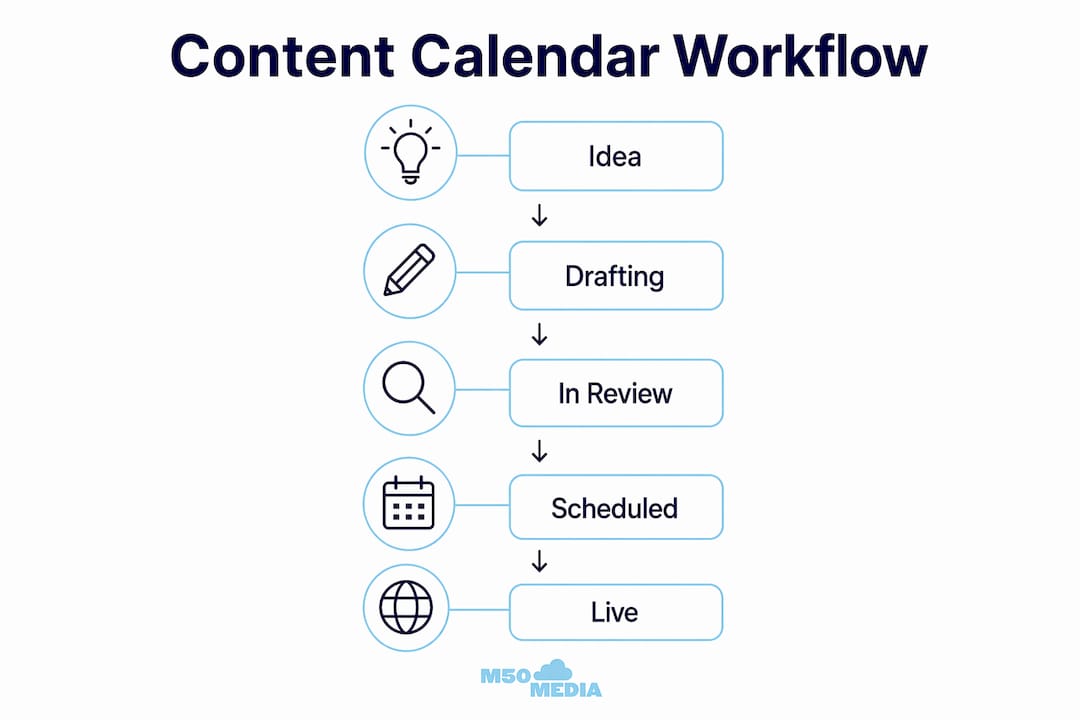
The core stages of a well-built editorial workflow look like this: Idea, Drafting, In Review, Scheduled, and Live. Tracking content by stage rather than by date alone lets your team spot bottlenecks before they become crises. If five pieces are stuck in “In Review” at the same time, you know immediately where to focus your energy.
Every piece in your calendar should carry a handful of key fields: title, content owner, status, due date, publish date, and channel. That is your foundation. Beyond those six fields, every extra column you add is a cost. Additional columns beyond five add complexity and hurt usability. Keep it lean.
The type of tool you use matters less than the discipline you bring to it. A shared Google Sheet works fine for a solo operator or a team of two. Project management platforms work better once you have multiple contributors and approval chains. The goal is visibility, not sophistication.
Workflow feature | Best suited tool type |
Stage tracking (Kanban view) | Project management platform |
Simple date scheduling | Shared spreadsheet |
Team task assignment | Project management platform |
Content brief linking | Any tool with URL fields |
Calendar view by channel | Dedicated content planning app |
Pro Tip: Link out to your full content briefs from the calendar instead of cramming brief details into calendar fields. Your calendar stays clean, and your writers get the detail they need.
How do you build a content calendar workflow step by step?
Building a content calendar workflow from scratch feels like assembling IKEA furniture without the picture guide. Here is the picture guide. ️
Step 1: Map your content stages
Start by naming the stages your content moves through. Stick to five or fewer. A reliable set is: Idea, Drafting, In Review, Scheduled, and Live. Add a “Refresh Queue” stage if you plan to update older content regularly (more on that shortly).
Step 2: Set your planning horizon
Plan 60–90 days ahead for a consistent rhythm without locking yourself into a rigid schedule. Sixty to ninety days gives you enough runway to align content with campaigns, seasons, and business goals while leaving room to react to timely topics. Anything shorter and you are always scrambling. Anything longer and the plan goes stale.
Step 3: Assign clear ownership
Every piece of content needs one owner. Not a team. One person. That person is responsible for moving the piece through stages and flagging blockers. Shared ownership is a polite way of saying no one is responsible.
Step 4: Set your publishing cadence
Decide how often you publish per channel and stick to it. Consistency beats volume every time. Two well-crafted blog posts per month outperform six rushed ones. Your content creation schedule should reflect what your team can actually sustain, not what sounds impressive.
Step 5: Build your weekly meeting rhythm
Weekly standup rituals keep the pipeline moving without turning your team into professional meeting attendees. A practical cadence looks like this:
Monday (30 minutes): Review the pipeline. Confirm what is in progress and what is due this week.
Wednesday (async check-in): Writers post a quick status update. No meeting required.
Friday (20 minutes): Retrospective. What shipped? What got blocked? What needs to change next week?
This rhythm catches problems early and keeps everyone aligned without eating the whole week.
Pro Tip: Limit each writer or editor to 2–3 active drafts at any one time. WIP limits prevent the “I have twelve things on the go and nothing is done” spiral that kills both quality and morale.
What are the most common content calendar workflow mistakes?
Even the best intentions can produce a calendar that nobody uses by week three. Here are the pitfalls worth watching for.
Process bloat. Every time you add a new status column or a new required field, you make the calendar harder to maintain. Cap your status columns at five. If a problem cannot be solved by a stage, solve it in a meeting instead.
Treating the calendar as a static date list. A calendar that only shows publish dates tells you nothing about where content is right now. Stage-based calendars show you the full picture and make bottlenecks visible at a glance.
Skipping reviewer SLAs. A review that has no deadline is a review that never happens. Establish a turnaround time for reviewers, such as five business days, and treat it like a contract. When reviews slip, content stalls.
Ignoring content updates. New content gets all the glory, but updated content often performs better. Protect 10–20% of your capacity for refreshing existing assets. A dedicated “Refresh Queue” stage in your calendar makes this habit automatic.
Building the calendar in isolation. A content calendar is a relational tool. Pressure-test your draft calendar with stakeholders before you lock it in. Misaligned priorities discovered in week one are far less painful than ones discovered in week eight.
Skipping the retrospective. The Friday retro is not optional. It is where you catch recurring blockers before they become permanent features of your workflow.
What templates and formats work best for content planning?
Templates are your shortcut to a working system. The goal is to pick a format that your team will actually use, not the one that looks the most impressive in a screenshot.
Calendar view
A calendar view shows content by publish date across a month. It is great for spotting gaps and avoiding channel overlap. Use it for your final publishing schedule once pieces have cleared the review stage.
Kanban board
A Kanban board shows content by stage rather than by date. It is the best format for day-to-day workflow management because it makes bottlenecks visible instantly. If your “In Review” column has eight cards and your “Scheduled” column has two, you know exactly where to focus.
Pipeline list
A pipeline list is a simple table showing every active piece with its stage, owner, due date, and channel. It works well for async check-ins and weekly standups because everyone can scan it in under two minutes.
Template format | Best use case |
Calendar view | Final publish schedule, gap spotting |
Kanban board | Day-to-day stage management |
Pipeline list | Standups, async updates |
Spreadsheet | Solo operators, small teams |
One underrated trick: batch the annoying parts of your workflow. Set aside one block of time per week to write all your meta descriptions, resize all your images, and schedule all your posts. Batching cuts the mental overhead of task-switching and speeds up your content production process considerably.
Pro Tip: Link your content brief directly from the calendar row. Your calendar stays clean, your writers have everything they need, and you avoid the “where is the brief again?” Slack thread that wastes twenty minutes every time.
For a broader look at how editorial planning fits into your overall marketing approach, the M50media content marketing strategy guide is a solid next read.
Key takeaways
A content calendar workflow succeeds when it tracks stages, assigns clear ownership, limits work in progress, and stays simple enough that your team actually uses it every week.
Point | Details |
Use stage-based tracking | Track content through named stages, not just publish dates, to spot bottlenecks early. |
Plan 60–90 days ahead | A rolling planning horizon keeps your strategy focused without locking you into a rigid schedule. |
Cap complexity at five stages | Every extra column or status reduces adoption; keep your calendar lean and link out to briefs. |
Set reviewer SLAs | A five-day review turnaround treated as a contract prevents content from stalling in approval. |
Protect refresh capacity | Reserve 10–20% of your team’s capacity for updating existing content to sustain long-term quality. |
Why simplicity is the most underrated editorial calendar tip
Here is my honest take after years of working with small business owners on their content planning: the fanciest calendar is almost never the most effective one. I have seen teams spend two weeks building a colour-coded, multi-tab, formula-laden spreadsheet that nobody touched after launch. (You know who you are. )
The teams that consistently publish good content are not the ones with the most sophisticated systems. They are the ones who made a simple system and actually stuck to it. Five stages. One owner per piece. A weekly check-in that takes less time than a coffee run. That is the whole secret.
What I have also learned is that the calendar is only as good as the conversations around it. Stakeholder alignment is not a one-time setup task. It is an ongoing habit. The teams that pressure-test their calendar with their stakeholders every quarter stay relevant. The ones that set it and forget it end up publishing content that nobody asked for.
Start with the simplest version of your workflow that could possibly work. Add complexity only when a specific, recurring problem demands it. And please, for the love of all things holy, do not add a new status column just because someone asked for it in a meeting. That is how process bloat begins, and process bloat is the silent killer of content programmes everywhere.
— Karl
Ready to get your content workflow sorted?
If reading this made you realise your current content planning process is held together with sticky notes and good intentions, you are not alone. Most small business owners start there.

M50media offers digital coaching and a free Marketing SOS call with Karl to help you build a content calendar workflow that actually fits your team and your goals. No cookie-cutter templates. No overwhelming jargon. Just practical, specific guidance from someone who has helped small businesses get their content act together. Check out the M50media blog for more resources, or book your free call and let’s figure out your next move together.
FAQ
What is a content calendar workflow?
A content calendar workflow is the structured process a team uses to plan, create, review, and publish content through defined stages. It goes beyond scheduling by tracking each piece from idea to live, making bottlenecks visible and keeping everyone accountable.
How far ahead should I plan my content calendar?
Plan 60–90 days ahead for the best balance of strategic focus and flexibility. This horizon gives you enough runway to align content with campaigns and seasonal moments without locking yourself into a plan that cannot adapt.
How many stages should a content calendar have?
Five stages is the recommended maximum: Idea, Drafting, In Review, Scheduled, and Live. Adding more stages increases complexity and reduces the likelihood that your team will maintain the calendar consistently.
What is a WIP limit and why does it matter?
A WIP (Work-In-Progress) limit caps how many active drafts a writer or editor handles at one time, typically 2–3 pieces. It prevents bottlenecks, reduces burnout, and keeps content moving through the pipeline at a steady pace.
How do I stop content from getting stuck in review?
Set a formal review turnaround time, such as five business days, and treat it as a standing agreement with your reviewers. Unblocking stuck content should happen in your weekly standup, not by adding more status columns to your calendar.
Recommended
Comments