How to start ecommerce: a beginner's guide for 2026
- karl7209
- Jun 10
- 8 min read

TL;DR:
Starting an ecommerce business involves establishing legal and financial foundations such as registering your business, obtaining an ID number, and opening a separate bank account.
Choosing the right platform like Shopify or BigCommerce, planning your store structure, and testing operational elements are crucial steps before launching.
Starting an ecommerce business means building a digital storefront that sells products or services online, reaching customers far beyond your local neighbourhood. Platforms like Shopify and BigCommerce have made this genuinely accessible, even if you have never written a line of code in your life. The industry term is “electronic commerce,” or ecommerce for short, and it covers everything from a one-person Etsy-style shop to a full-scale online retail operation. Whether you are dreaming of selling handmade candles or dropshipping gadgets, knowing how to start ecommerce the right way saves you from the classic beginner blunders that sink so many promising shops before they ever make their first sale.
What legal and financial steps must you complete first?
Before you pick a platform or photograph a single product, you need your legal and financial house in order. Think of it like building a house: you would not skip the foundation just because the roof looks more exciting. Getting this right protects you, your money, and your future customers.
Here is what you need to sort out before anything else:
Business registration and legal structure. Establishing a formal legal entity, such as a corporation in Canada or an LLC in the US, protects your personal assets from business liabilities. Without this, a customer dispute or supplier problem could come after your personal savings.
Business ID number. In Canada, you register with the CRA to obtain a Business Number. In the US, obtaining an EIN is mandatory for most payment providers to process transactions legally. No ID, no payments. It is that simple.
Separate business bank account. Mixing personal and business finances is a critical liability risk. Open a dedicated business chequing account from day one, full stop.
Accounting software. Integrate a tool like QuickBooks Online from the very start to automate bookkeeping and keep your financial records clean. Tax season will thank you.
GST/HST registration. In Canada, once your revenue hits $30,000 in a calendar year, registration is required. Set up the tracking early so you are not scrambling later.
Pro Tip: Do not wait until you make your first sale to open a business bank account. Set it up the same week you register your business. Future-you will be extremely grateful.
The legal setup feels like homework, but it is the kind of homework that keeps you out of serious trouble. A few hours of admin now beats a very stressful conversation with the CRA later.
Which ecommerce platforms should beginners consider?
Choosing your platform is one of the most consequential decisions you will make when starting an online store. Get this right and everything else flows more smoothly. Get it wrong and you are rebuilding from scratch six months in (not fun, ask anyone who has done it).
Here is a comparison of the most popular options for beginners in 2026:
Platform | Best for | Ease of use | Starting cost (approx.) | Standout feature |
Shopify | Most beginners | Very easy | ~$39 CAD/month | Drag-and-drop builder, no coding needed |
BigCommerce | Growing stores | Easy to moderate | ~$39 USD/month | Advanced features, no transaction fees |
WooCommerce | WordPress users | Moderate | Free plugin + hosting | Full customisation control |
Wix eCommerce | Micro-businesses | Very easy | ~$27 CAD/month | Beginner-friendly templates |
Shopify is the most popular choice for good reason. It offers a drag-and-drop storefront builder, built-in inventory management, and shipping setup, all without touching a single line of code. BigCommerce suits entrepreneurs who anticipate scaling quickly and want advanced functionality baked in from the start.

When evaluating any platform, check for mobile-friendly design (over 60% of online shopping happens on phones), built-in SEO tools, and payment gateway integrations. A platform that does not play nicely with Stripe or PayPal is going to create headaches at checkout. Speaking of which, understanding technical SEO for ecommerce from the beginning gives your store a serious head start in search rankings.
Pro Tip: Start with Shopify’s free trial and build a test store before committing. You will know within a week whether the interface feels right for you.
How to plan and build your online store for sales
Now for the fun part. Building your store is where your vision starts to look like a real business. But “fun” does not mean “random.” Structure matters enormously here.
Follow these steps in order:
Conduct market research. Before you list a single product, validate demand. Use Google Trends, keyword tools, and ecommerce keyword research to confirm people are actually searching for what you plan to sell. Passion is great. Profitable passion is better.
Run a financial feasibility check. Analysing profit margins and potential volume before investing is non-negotiable. A product that costs $40 to source and ships for $15 but only sells for $60 is not a business. It is a very expensive hobby.
Build your brand identity. Choose a memorable domain name, design a clean logo (Canva works brilliantly for beginners), and define your brand colours and tone of voice. Your ecommerce branding sets the emotional tone for every customer interaction.
Organise your product categories. Follow the three-click rule: customers should reach any product within three clicks from your homepage. More than that and they leave. Simple, logical navigation is a conversion tool, not just a design preference.
Write compelling product listings. Lead with benefits, not just specifications. “Keeps your coffee hot for 12 hours” beats “stainless steel double-wall insulation” every time. Include high-quality photos from multiple angles.
Choose a mobile-responsive template. Most platforms offer free themes that look great on phones. Pick one, customise the colours and fonts to match your brand, and resist the urge to over-design. Clean and fast beats flashy and slow.
A well-structured store is not just prettier. It converts better, ranks higher in search, and builds trust with first-time visitors who know nothing about you yet. For a deeper look at promoting what you build, the M50media guide on ecommerce marketing covers the full promotional picture.
What operational tasks must you complete before launch?
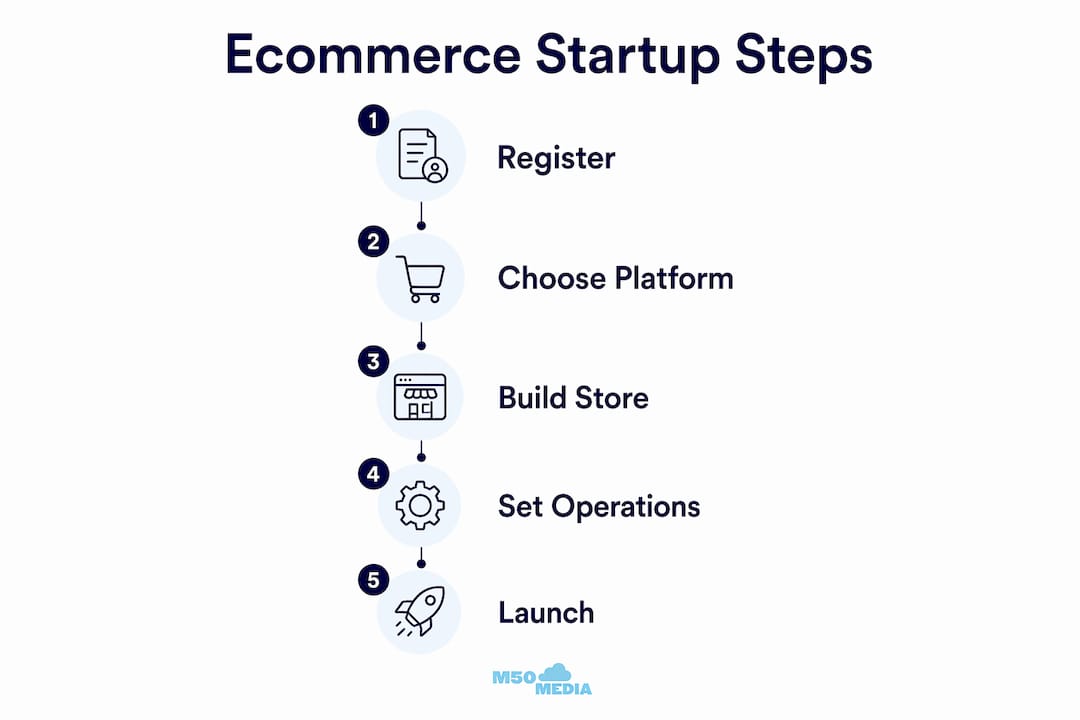
You are almost there! But “almost ready” is not “ready.” This section covers the operational checklist that separates a store that works from one that frustrates customers and loses sales on day one.
Here is what needs to be in place before you go live:
Payment gateway setup. According to Stripe, choosing the right payment systems is crucial because your platform, payment flow, and legal obligations are all interconnected. At minimum, accept major credit and debit cards. Ideally, also support digital wallets and BNPL options like Apple Pay, Google Pay, and Afterpay. Shoppers expect options.
Shipping configuration. Set clear shipping rates, delivery timeframes, and carrier options. Surprise shipping costs at checkout are the number one reason for cart abandonment. Transparency wins.
Tax compliance. In Canada, configure your store to collect GST/HST based on the customer’s province. If you sell into the US, understand economic nexus rules by state. Your platform’s tax settings can automate most of this.
Returns and refund policy. Write a clear, fair policy and display it prominently, on your footer, your product pages, and your checkout page. Customers who trust your return policy buy more confidently.
Full store test. Place a real test order yourself. Check the checkout flow, email confirmations, mobile display, and payment processing. Then ask a friend to do the same and watch where they get confused.
Pro Tip: Set up Google Analytics and Meta Pixel before you launch, not after. You want data from your very first visitor, not just from visitor number 500.
Once your store passes the test-order check, you are genuinely ready to launch. From there, consistent marketing effort is what separates stores that grow from stores that stagnate. The M50media breakdown of top ecommerce marketing types is a solid next read once you are live.
Key takeaways
Starting ecommerce successfully requires completing legal setup, choosing the right platform, building a structured store, and testing every operational element before your first customer arrives.
Point | Details |
Legal setup comes first | Register your business, get a Business Number, and open a separate bank account before anything else. |
Platform choice shapes everything | Shopify suits most beginners; BigCommerce fits those planning to scale quickly from the start. |
Financial feasibility before products | Analyse margins and volume potential before investing in inventory to avoid unprofitable ventures. |
Three-click navigation rule | Customers should reach any product within three clicks to reduce abandonment and improve conversions. |
Test before you launch | Place a real test order and check mobile usability, checkout flow, and email confirmations first. |
Karl’s honest take on launching an ecommerce store
I have worked with a lot of aspiring ecommerce entrepreneurs over the years, and the pattern I see most often is this: people spend weeks agonising over their logo and approximately 20 minutes thinking about their profit margins. That is backwards.
Before you fall in love with your brand colours, run the numbers. A financial feasibility check is not glamorous, but it is the single most important thing you can do before spending a dollar on inventory or ads. I have seen genuinely great-looking stores fail because the founder never confirmed the product could actually make money at scale.
The other thing I will say: separate your finances from day one. Not next month. Not after your first sale. Day one. I have watched people create enormous tax headaches for themselves simply because they ran business expenses through a personal account for six months. It sounds boring, but it is the kind of discipline that keeps your business alive long enough to become something real.
Finally, do not expect your first marketing strategy to work perfectly. It almost never does. The entrepreneurs who succeed are the ones who launch, measure, adjust, and try again. Use analytics, pay attention to what your customers actually do (not just what they say), and build loyalty through excellent support. A customer who feels genuinely looked after tells their friends. That is still the best marketing on the planet.
— Karl
Ready to launch faster with expert support?
Building an ecommerce store on your own is absolutely doable. But having an experienced guide in your corner can shave months off your learning curve and help you avoid the costly mistakes most beginners make.

At M50media, Karl Lundgren works directly with aspiring entrepreneurs to cut through the noise and build ecommerce businesses that actually grow. Whether you need a full digital coaching programme or just a focused session to get unstuck, there is an option for you. Not sure where to start? Book a free Marketing SOS call and get personalised direction in one conversation. Or explore the full coaching services to see how Karl can support your launch from strategy to sale.
FAQ
What do I need to start ecommerce in Canada?
You need a registered business, a Business Number from the CRA, a separate business bank account, and an ecommerce platform like Shopify or BigCommerce. GST/HST registration is required once your annual revenue exceeds $30,000.
How much does it cost to launch an ecommerce site?
Basic startup costs typically include a platform subscription (around $39 CAD/month for Shopify), a domain name (roughly $15 to $20 CAD/year), and initial product inventory or supplier fees. Many founders launch for under $500 CAD before their first sale.
Which ecommerce platform is best for beginners?
Shopify is the most beginner-friendly option in 2026, offering a drag-and-drop store builder with no coding required, plus built-in tools for inventory, shipping, and payments. BigCommerce is a strong alternative for those planning to scale quickly.
How do I accept payments on my online store?
Integrate a payment gateway like Stripe or PayPal through your chosen platform. Your provider should accept major credit cards, digital wallets like Apple Pay and Google Pay, and ideally buy now, pay later options to maximise checkout conversions.
How long does it take to launch an online store?
A basic store can be live in as little as one to two weeks if you have your products, brand assets, and legal setup ready. A more polished, fully tested store typically takes four to six weeks from registration to launch.
Recommended
Comments