What is email deliverability? a 2026 guide

TL;DR:
Email deliverability determines whether your emails reach your subscribers’ primary inbox or get filtered into spam. Maintaining a high inbox placement rate above 90-95% depends on proper authentication, list quality, and managing complaint rates. Regularly monitoring deliverability metrics and implementing best practices are essential for successful email marketing in 2026.
Email deliverability is defined as the ability of your emails to land in your subscribers’ primary inbox rather than getting filtered into spam, junk, or promotional folders. This is not the same as simply “sending” an email. Inbox placement sits at roughly 83% globally, meaning about 1 in 6 marketing emails never reaches the inbox at all. That’s a staggering number when you think about the time, money, and creativity poured into a campaign. Tools like SPF (Sender Policy Framework), DKIM (DomainKeys Identified Mail), and DMARC (Domain-based Message Authentication, Reporting, and Conformance) are no longer optional extras. They are the foundation of any email programme that actually works in 2026.
What is email deliverability and why should you care?
Email deliverability is the industry term for measuring whether your messages consistently reach the primary inbox. Think of it as the difference between mailing a letter and knowing it was actually read, versus just confirming it left your hands.
A healthy inbox placement rate sits at 90–95% or higher. Anything below 80% is a red flag that demands immediate attention. If your open rates have mysteriously tanked, deliverability is almost always the first place to look, not your subject line.
For small business owners and email marketers, this matters because every email that lands in spam is revenue left on the table. Your email marketing guide might be flawless, but if the inbox never sees it, it might as well not exist.
What factors affect email deliverability?
Several interconnected factors determine whether your emails land where they should. Understanding each one gives you real control over your results.

Sender Reputation
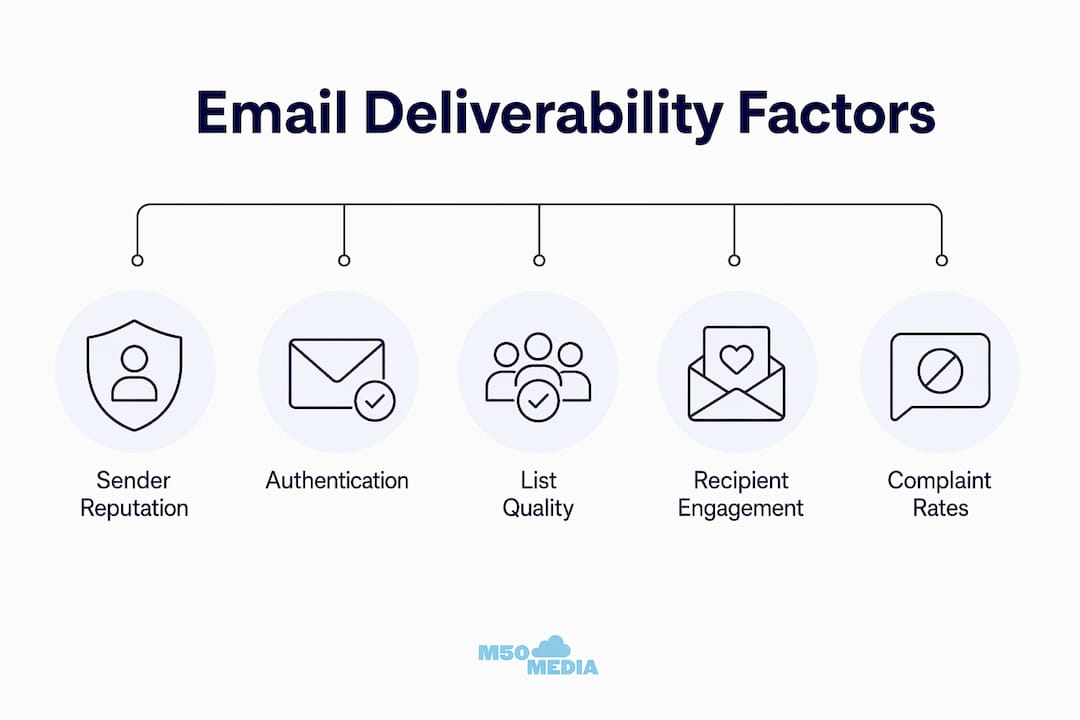
Your sender reputation is a score mailbox providers assign to your sending domain and IP address based on your sending history. High complaint rates, frequent bounces, and low engagement all drag that score down. Once it drops, recovering it takes weeks of careful, consistent sending.
Authentication Protocols: SPF, DKIM, and DMARC
Authentication is now mandatory for bulk senders. Google, Yahoo, and Microsoft require proper SPF, DKIM (at minimum 1,024-bit keys), and DMARC policies for domains sending 5,000 or more messages per day. Domains that skip this face rejection or automatic spam routing. No exceptions.
List Quality
A dirty list is a deliverability killer. B2B email lists decay at 25–28% annually, which means a list you built two years ago could be one-quarter dead addresses. Sending to invalid or disengaged contacts inflates your bounce rate and tanks your reputation fast.
Recipient Engagement
Opens, clicks, and replies all signal to mailbox providers that your audience wants your content. Low engagement tells their algorithms the opposite. AI-driven filters now weigh historical recipient behaviour heavily when deciding where your next email lands.
Spam Complaint Rates
Complaint rates above 0.3% trigger throttling or spam folder routing by Gmail, Yahoo, and Microsoft. Your target is under 0.10%. Even a small spike from a poorly targeted campaign can cause lasting damage to your sender reputation.
Pro Tip: Use a double opt-in process for new subscribers. It adds one extra step, but it filters out fake addresses and dramatically reduces complaint rates from day one.
Delivery rate vs. inbox placement vs. deliverability
These three terms get mixed up constantly, and that confusion leads to misreading your campaign reports. Here is how they actually differ.
Delivery rate measures server acceptance, not inbox arrival. A 98% delivery rate just means the receiving server accepted your message. It says nothing about whether that message went to the inbox, the spam folder, or the promotions tab. Inbox placement is the metric that actually matters, and most email service providers (ESPs) cannot measure it without seed lists.
Metric | What It Measures | Typical Range | Red Flag |
Delivery Rate | Server accepted the email | 95–99% | Below 90% |
Inbox Placement Rate | Email landed in primary inbox | 83–95% | Below 80% |
Email Deliverability | Overall inbox performance over time | Varies by domain | Declining trend |
Spam Complaint Rate | Recipients marking as spam | Under 0.10% ideal | Above 0.30% |
The gap between delivery rate and inbox placement is where most small business marketers get blindsided. Your ESP dashboard might show a 97% delivery rate while 20% of your emails are quietly rotting in spam folders. That is why monitoring inbox placement specifically, using seed list tools, is a non-negotiable part of any serious email programme.
How do gmail, yahoo, and outlook filter your emails?
Mailbox providers are the gatekeepers of the inbox, and each one plays by slightly different rules. Gmail, Yahoo, and Microsoft Outlook collectively handle the vast majority of consumer and business inboxes worldwide.
Gmail uses a combination of authentication checks, sender reputation scoring, and AI-weighted engagement signals to route emails. It watches how recipients interact with your messages over time. If your last five campaigns had low open rates from Gmail users, the sixth one is more likely to land in promotions or spam.
Gmail: Prioritises engagement history and authentication. Promotions tab routing is common for marketing emails even when spam is avoided.
Yahoo: Enforces strict complaint rate thresholds. Exceeding 0.3% complaint rates triggers immediate filtering.
Microsoft Outlook: Uses SmartScreen filtering and its own reputation database. Business inboxes on Microsoft 365 often have stricter filtering than consumer accounts.
Consumer inboxes and business inboxes also behave differently. A B2B campaign hitting Microsoft 365 inboxes faces tighter security policies and IT-managed filtering rules that a consumer Gmail account simply does not have. Knowing your audience’s primary inbox provider helps you tailor your sending strategy accordingly.
How to improve email deliverability in 2026
Good news: most deliverability problems are fixable. Here is a practical, ordered approach that works for small businesses and seasoned marketers alike.
Set up SPF, DKIM, and DMARC correctly. Start with SPF and DKIM records in your DNS settings. Then implement DMARC using a phased 12-week approach: begin with p=none to collect data, move to p=quarantine, then graduate to p=reject. This protects legitimate emails from being blocked during setup.
Verify and clean your list before every major campaign. Use tools like ZeroBounce or NeverBounce to remove invalid addresses. Pre-campaign verification is often the highest-ROI activity a marketer can do, especially for B2B lists that decay at 25–28% per year.
Segment by engagement. Create separate segments for highly engaged subscribers (opened in the last 90 days) and less engaged ones. Send your most important campaigns to engaged segments first to protect your sender reputation.
Monitor your spam complaint rate weekly. Keep it under 0.10%. If it spikes, pause sending to the affected segment and investigate the cause before continuing.
Use seed lists to test inbox placement. Tools like GlockApps or Mail-Tester let you send to a test list of real addresses across Gmail, Yahoo, and Outlook to see exactly where your emails land before you hit send on a live campaign.
Pro Tip: Hard bounces are not all created equal. A sudden spike in hard bounces on your first send to a new list signals a list quality problem that needs fixing immediately. Soft bounces, on the other hand, may resolve on their own after one or two retries.
Action | Frequency | Impact Level |
List verification | Before major campaigns | High |
DMARC policy review | Quarterly | High |
Complaint rate check | Weekly | High |
Engagement segmentation | Monthly | Medium |
Seed list inbox test | Before each campaign | Medium |
For a deeper look at email marketing tips that pair well with strong deliverability practices, M50media has you covered.
Key takeaways
Email deliverability is controlled by sender reputation, authentication, list quality, and engagement, and all four must be managed continuously to maintain strong inbox placement.
Point | Details |
Deliverability vs. delivery | Delivery confirms server acceptance; deliverability measures actual inbox placement. |
Authentication is mandatory | SPF, DKIM, and DMARC are required by Gmail, Yahoo, and Outlook for bulk senders in 2026. |
List decay is real | B2B lists lose 25–28% of valid addresses annually; verify before every major send. |
Complaint rate threshold | Keep spam complaints under 0.10% to avoid filtering by major mailbox providers. |
Monitor with seed lists | Delivery rate alone does not reveal inbox placement; use seed list tools to see the full picture. |
The uncomfortable truth about email deliverability
Here is something I have seen trip up even experienced marketers: they spend hours obsessing over subject lines and send times while their DMARC record is still set to p=none and their list has not been cleaned in two years. Then they wonder why open rates are falling.
Deliverability is not a one-time setup. It is an ongoing process, more like tending a garden than installing a fence. The mailbox providers’ AI systems are constantly re-evaluating your sending behaviour based on how recipients engage with your emails. That means a great month can be undone by one poorly targeted blast to a stale segment.
The fix is almost never the subject line. In my experience, the vast majority of deliverability problems trace back to three things: missing or misconfigured authentication, a list that has not been cleaned recently, and complaint rates that crept up without anyone noticing. Fix those three, and most campaigns recover quickly.
I also want to push back on the idea that deliverability is too technical for small business owners. Yes, SPF and DKIM records live in your DNS settings, which sounds intimidating. But most modern ESPs like Klaviyo walk you through the setup step by step. You do not need to be a developer. You just need to do it.
The marketers who win at email in 2026 are not the ones with the cleverest copy. They are the ones whose emails actually show up.
— Karl
Let’s get your emails into the inbox
If your open rates are sliding and you are not sure why, it is time to stop guessing and start diagnosing. At M50media, Karl works directly with small business owners and email marketers to untangle deliverability problems, set up proper authentication, and build list strategies that actually hold up over time.

Whether you need a full email marketing audit or just a second set of eyes on your current setup, Karl’s coaching is built for exactly this kind of practical, real-world problem-solving. No fluff, no generic advice. Just clear steps tailored to your business. Book a free Marketing SOS call and let’s figure out what is standing between your emails and the inbox.
FAQ
What is the difference between email delivery and deliverability?
Email delivery confirms that a receiving server accepted your message. Email deliverability measures whether that message actually landed in the primary inbox rather than spam or promotional folders.
What is a good inbox placement rate in 2026?
A healthy inbox placement rate is 90–95% or higher. The global average sits at roughly 83%, and anything below 80% signals a serious problem requiring immediate attention.
How do i test my email deliverability?
Use seed list tools like GlockApps or Mail-Tester to send test emails to real addresses across Gmail, Yahoo, and Outlook. These tools show you exactly where your emails land before you send to your live list.
What spam complaint rate is too high?
Complaint rates above 0.3% trigger filtering or throttling by Gmail, Yahoo, and Microsoft. Keep your rate under 0.10% to maintain strong inbox placement and sender reputation.
Do i really need DMARC if i already have SPF and DKIM?
Yes. SPF and DKIM authenticate your emails, but DMARC tells mailbox providers what to do when authentication fails. Without it, spoofed emails using your domain can damage your sender reputation, and major providers now require DMARC for bulk senders.
Recommended
Comments