Why invest in CRM: a smart guide for SMBs
- karl7209
- Jun 8
- 8 min read

TL;DR:
Investing in a CRM enhances sales productivity, customer retention, and automates manual tasks for small and mid-sized businesses. Choosing a user-friendly system that aligns with current workflows and investing in team training ensures successful adoption and quick ROI. Effective CRM use fosters unified data, personalized customer engagement, and scalable growth.
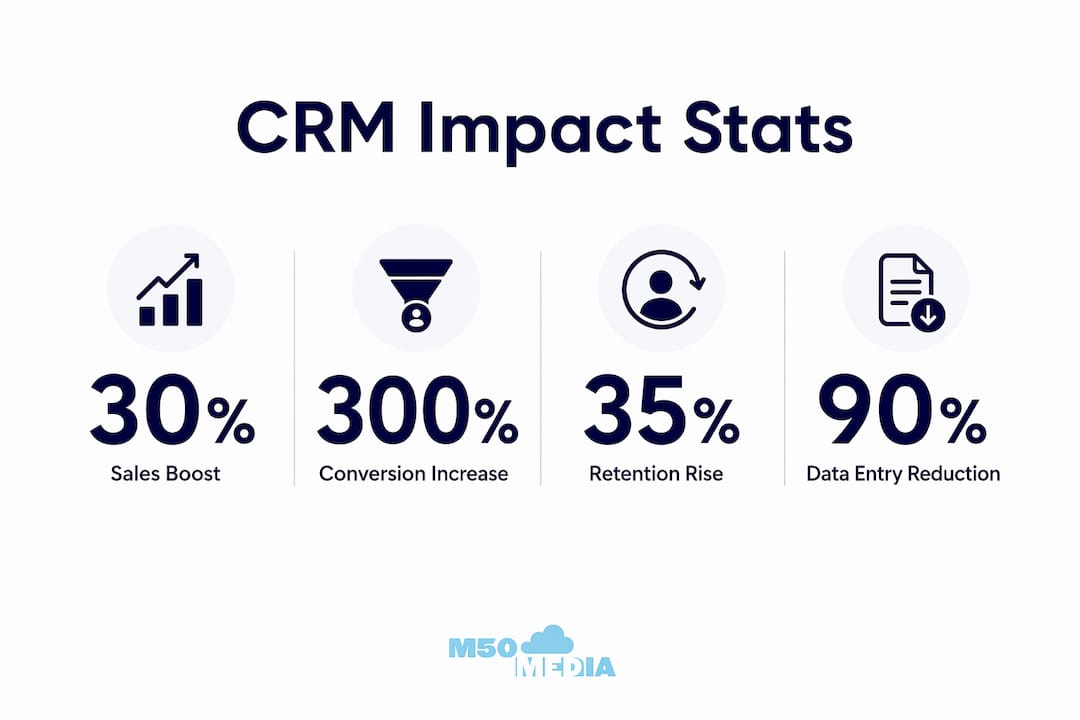
A CRM (Customer Relationship Management) system is a software platform that centralises customer data, automates routine tasks, and connects your sales, marketing, and support teams under one roof. If you’re asking why invest in CRM, the short answer is this: businesses using CRM see sales productivity rise 25 to 30%, conversion rates jump up to 300%, and customer retention improve by 20 to 27%. That’s not a rounding error. That’s the difference between a business that’s winging it on spreadsheets and one that actually knows what’s happening with its customers. Platforms like HubSpot, Salesforce, and monday.com CRM have made these tools more accessible than ever for small and mid-sized businesses (SMBs), and the automation trend is only accelerating.
What are the primary benefits of investing in a CRM system?
The benefits of CRM go well beyond keeping a tidy contact list. Think of a CRM as the GPS for your entire customer journey. Without it, you’re guessing at every turn.
Sales productivity and conversion rates
CRM integration boosts sales productivity by 25 to 30% and can push conversion rates up to 300%. That means your sales team closes more deals without working more hours. It’s not magic. It’s just having the right information at the right time, every time.

Customer retention and personalised engagement
A CRM improves customer retention by 20 to 35% by enabling proactive outreach and personalised communication. Instead of sending the same generic email blast to everyone (we’ve all been on the receiving end of those), your team can segment customers, track their history, and reach out at exactly the right moment. Think of it as the difference between a Hallmark Christmas movie and a film that actually remembers your name.
Automation and time savings
CRM systems reduce manual data entry by up to 90%, saving teams 5 to 8 hours per week. That’s basically a full workday returned to your team every single week. Those hours go back into selling, strategising, and actually talking to customers instead of copying and pasting data between spreadsheets.
Unified data and broken-down silos
Fragmented data storage leads to lost opportunities and duplicated work. A CRM centralises everything so your sales rep, your marketing coordinator, and your support person are all looking at the same customer record. No more “I thought you handled that” moments. No more leads falling through the cracks because someone’s spreadsheet was out of date.
Here’s a quick look at the core advantages of using CRM:
Sales teams get real-time pipeline visibility and automated follow-up reminders
Marketing teams can segment audiences and personalise campaigns based on actual behaviour
Support teams access full customer history instantly, reducing resolution time
Leadership gets accurate reporting without chasing down numbers from three different people
Everyone works from the same data, which means fewer mistakes and faster decisions
How do premium CRM platforms compare to basic systems?
Not all CRM tools are created equal. A basic CRM might let you store contacts and log calls. A premium CRM, on the other hand, is closer to having a data analyst, a sales coach, and an automation engineer all working for you simultaneously.
Feature | Basic CRM | Premium CRM |
Contact management | Yes | Yes |
Pipeline tracking | Limited | Advanced with AI scoring |
Automation | Minimal | Up to 90% of data entry automated |
Forecasting | Manual | AI-powered predictive forecasting |
Customisation | Template-based | No-code workflow builder |
ROI timeline | 12+ months | 3 to 6 months |
AI-powered features in premium CRMs include predictive forecasting, intelligent lead prioritisation, and automated data capture. This matters because your sales team stops guessing which leads to chase and starts working a prioritised list that the system builds for them. That’s a meaningful shift in how deals get closed.
Premium CRMs typically pay for themselves within 3 to 6 months through increased revenue and automation savings. For an SMB watching every dollar, that’s a compelling argument. The upfront investment looks a lot less scary when you realise the system is essentially funding itself through efficiency gains and better close rates.
The no-code customisation angle is worth highlighting too. Older enterprise CRMs required an IT team just to change a field label. Modern premium platforms like HubSpot and monday.com CRM let your ops person build custom workflows without writing a single line of code. That removes a massive bottleneck for growing businesses.
Pro Tip: Before comparing premium CRM pricing, map out how many hours per week your team spends on manual data entry. Multiply that by your average hourly labour cost. That number is your baseline ROI calculation, and it usually surprises people.
You can also explore how AI in marketing is reshaping CRM capabilities in 2026, particularly around predictive customer behaviour and automated personalisation.
When is the right time for a small business to invest in CRM?
Here’s the honest truth: most SMBs wait too long. They stick with spreadsheets until the spreadsheets are basically a second job. Investing in CRM is most valuable once manual methods become operational burdens, signalling that your business has outgrown its current tools.
Watch for these signs that you’re ready:
Spreadsheet overload. You have more than one person updating customer data in separate files. Conflicts and duplicates are a weekly occurrence.
Data fragmentation. Customer information lives in email threads, sticky notes, a shared Google Sheet, and someone’s personal notebook. (You know who you are.)
Manual process bottlenecks. Your team spends more time on admin than on actual selling or customer service.
Missed follow-ups. Leads are going cold because nobody remembered to check in. Deals are slipping away not because of price or product, but because of timing.
No visibility. Leadership can’t get an accurate sales forecast without emailing three people and waiting two days.
That said, there’s a real risk on the other side too. Businesses often fail CRM adoption due to poor team buy-in or choosing overly complex systems. Jumping straight into a full enterprise platform when your team of eight has never used a CRM before is a recipe for frustration and wasted budget. Small businesses should select CRMs that match their workflow to avoid re-engineering processes or poor adoption.
The sweet spot is a system that’s slightly ahead of where you are today, not five years ahead. You can always scale up features as your team matures.
Pro Tip: Run a two-week audit before you buy anything. Track every customer touchpoint manually and note where information gets lost or delayed. That audit becomes your CRM requirements list.
What practical steps help maximise CRM investment?
Buying a CRM is the easy part. Getting your team to actually use it, and use it well, is where the real work happens. Here’s how to set yourself up for success:
Conduct an internal needs assessment. Map your existing workflows before you evaluate any platform. Know which processes are broken, which are working, and what integrations you’ll need (email, calendar, accounting software, etc.).
Choose for usability first. A CRM your team finds confusing will collect digital dust within three months. Prioritise platforms with clean interfaces and strong onboarding support. HubSpot’s free tier is a popular starting point for SMBs for exactly this reason.
Invest in training. Effective CRM adoption requires training and easing cultural transition to overcome resistance. Block time for proper onboarding. Don’t just hand people a login and hope for the best.
Assign a CRM champion. Designate one person internally who owns the CRM, monitors usage, and troubleshoots issues. This person becomes your internal expert and keeps adoption from sliding.
Leverage integrations. Connect your CRM to the tools your team already uses. Gmail, Outlook, Slack, Mailchimp, and QuickBooks all integrate with major CRM platforms. The less your team has to switch between tools, the more they’ll actually use the CRM.
For SMBs in ecommerce, CRM in ecommerce growth is a particularly strong use case, with automation handling cart abandonment, post-purchase follow-ups, and loyalty programme management with minimal manual effort.
Centralising fragmented data eliminates silos and enables personalised customer experiences at scale. That’s the long game. You’re not just buying software. You’re building a system that gets smarter and more valuable the more data you put into it.
Key takeaways
CRM investment pays off fastest when the platform matches your team’s workflow, adoption is supported by training, and AI-powered features replace manual processes.
Point | Details |
Sales productivity gains | CRM integration raises sales productivity by 25 to 30% and can triple conversion rates. |
Retention improvement | Proactive, personalised engagement through CRM improves customer retention by 20 to 35%. |
Automation saves hours | Reducing manual data entry by up to 90% returns 5 to 8 hours per week to your team. |
Premium CRM ROI | Premium platforms typically pay for themselves within 3 to 6 months through efficiency and revenue gains. |
Adoption is the real challenge | Choosing a CRM that fits your workflow and investing in training determines long-term success. |
Karl’s honest take on CRM for SMBs
I’ve worked with a lot of small business owners who bought a CRM and then quietly stopped using it within six months. The platform wasn’t the problem. The approach was.
The most common mistake I see is buying for the future instead of the present. A founder with a team of six does not need a Salesforce enterprise licence with custom objects and a dedicated admin. They need something clean, fast, and easy enough that their sales rep will actually log calls without being nagged. Over-investing in complex enterprise CRMs can genuinely harm SMBs. Fit and usability beat feature-bloat every single time.
The second thing I’d push back on is the idea that CRM is purely a technology decision. It’s not. It’s a cultural one. When you introduce a CRM, you’re asking people to change how they work, what they track, and how they report. That’s a bigger ask than most business owners anticipate. CRM adoption is as much cultural change as technology shift, and the businesses that succeed are the ones that treat it that way. They communicate the “why” to their team. They celebrate early wins. They don’t just flip a switch and expect compliance.
My advice? Start simple. Pick a platform your team will actually use. Get 80% adoption on the basics before you even think about advanced features. The CRM as a revenue operations system framing is exciting, but it only works if your team is actually in the system every day. Build that habit first. The AI and the predictive analytics will still be there when you’re ready.
— Karl
Ready to get more from your CRM investment?
Picking the right CRM is one thing. Building the strategy around it is another. At M50media, Karl works directly with small and mid-sized business owners to cut through the noise, identify the right tools, and build marketing and sales systems that actually grow revenue.
Whether you’re still evaluating platforms or you’ve already got a CRM gathering dust, a free marketing SOS call is the fastest way to get a clear, personalised plan. No fluff, no generic advice. Just a direct conversation about what’s working, what isn’t, and what to do next. You can also explore business coaching with Karl for ongoing support as you scale. Visit M50media to learn more about how we help SMBs grow smarter.
FAQ
What does CRM stand for and what does it do?
CRM stands for Customer Relationship Management. It’s a software platform that centralises customer data, automates follow-ups, and connects sales, marketing, and support teams so everyone works from the same information.
How much does a CRM improve sales performance?
CRM integration increases sales productivity by 25 to 30% and can improve conversion rates by up to 300%, according to 2026 data. Those gains come from better lead visibility, automated reminders, and faster access to customer history.
When should a small business invest in CRM software?
The right time to invest is when manual methods like spreadsheets and email threads become operational bottlenecks. Signs include missed follow-ups, fragmented data, and no reliable sales forecast.
How long does it take for a CRM to pay for itself?
Premium CRM platforms typically pay for themselves within 3 to 6 months through automation savings and increased revenue. The ROI timeline shortens when adoption is strong and the platform matches your existing workflow.
Why do some businesses fail at CRM adoption?
Poor team buy-in and choosing overly complex systems are the two leading causes of CRM failure. Successful adoption requires matching the platform to your team’s technical comfort level and dedicating time to proper training and change management.
Recommended
Comments